
Building a Serverless Cloud-Optimized GeoTIFF (COG) Dynamic Mosaicing Pipeline with AWS Lambda and TiTiler
Introduction
Pre-rendering an XYZ tile pyramid has traditionally been a practical way to publish satellite imagery to web mapping applications. However, maintaining static tile pyramids becomes increasingly expensive when a platform manages millions of raster scenes, multiple acquisition dates, overlapping satellite footprints, and frequently updated imagery collections.
Every change to a source image or rendering configuration can require additional tile generation, storage, and cache invalidation. Worse, users cannot easily request a new combination of scenes, spectral bands, or processing parameters without introducing another preprocessing workflow.
A Serverless COG Dynamic Mosaicing TiTiler AWS Lambda architecture addresses these challenges by separating raster storage, spatial indexing, and tile rendering.
Cloud-Optimized GeoTIFFs (COGs) retain imagery in a tiled, overview-enabled raster format designed for efficient access through HTTP range requests. Rather than downloading an entire scene, a compatible reader retrieves the image regions and metadata required for a particular operation. The OGC Cloud Optimized GeoTIFF standard formalizes the key requirements behind this approach.
TiTiler builds on these capabilities to generate raster tiles dynamically. AWS Lambda executes the rendering application on demand, Amazon S3 stores the source imagery, and MosaicJSON provides spatial indexing for collections of overlapping COGs. API Gateway exposes the service to clients, while CloudFront caches frequently requested output tiles.
The result is a cloud-native raster delivery pipeline that can support changing satellite collections without requiring a complete static tile pyramid.
This guide develops the architecture, implementation workflow, deployment configuration, caching strategy, and production engineering considerations.
1. System Architecture
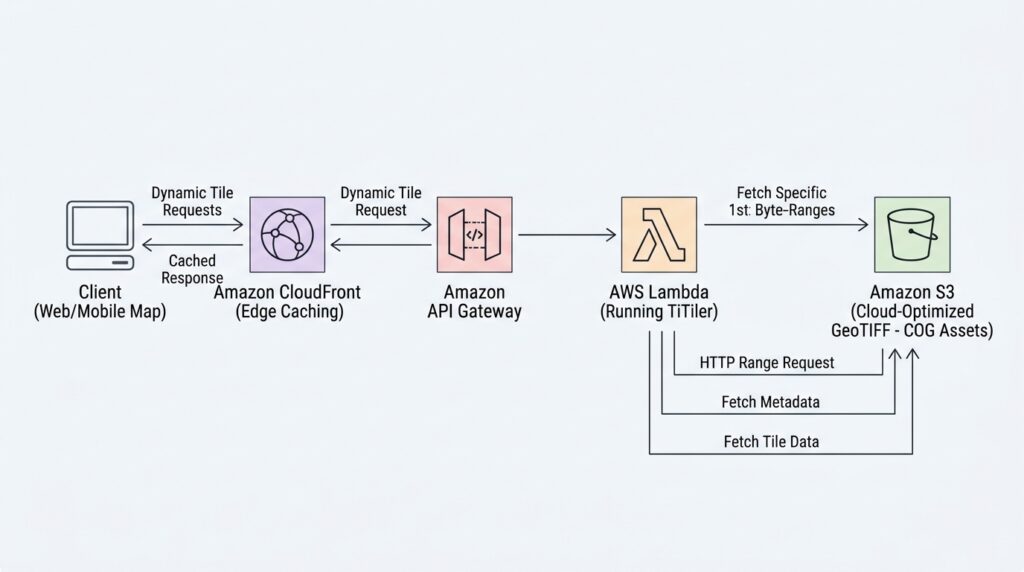
The proposed architecture separates the data plane from the rendering and delivery layers.
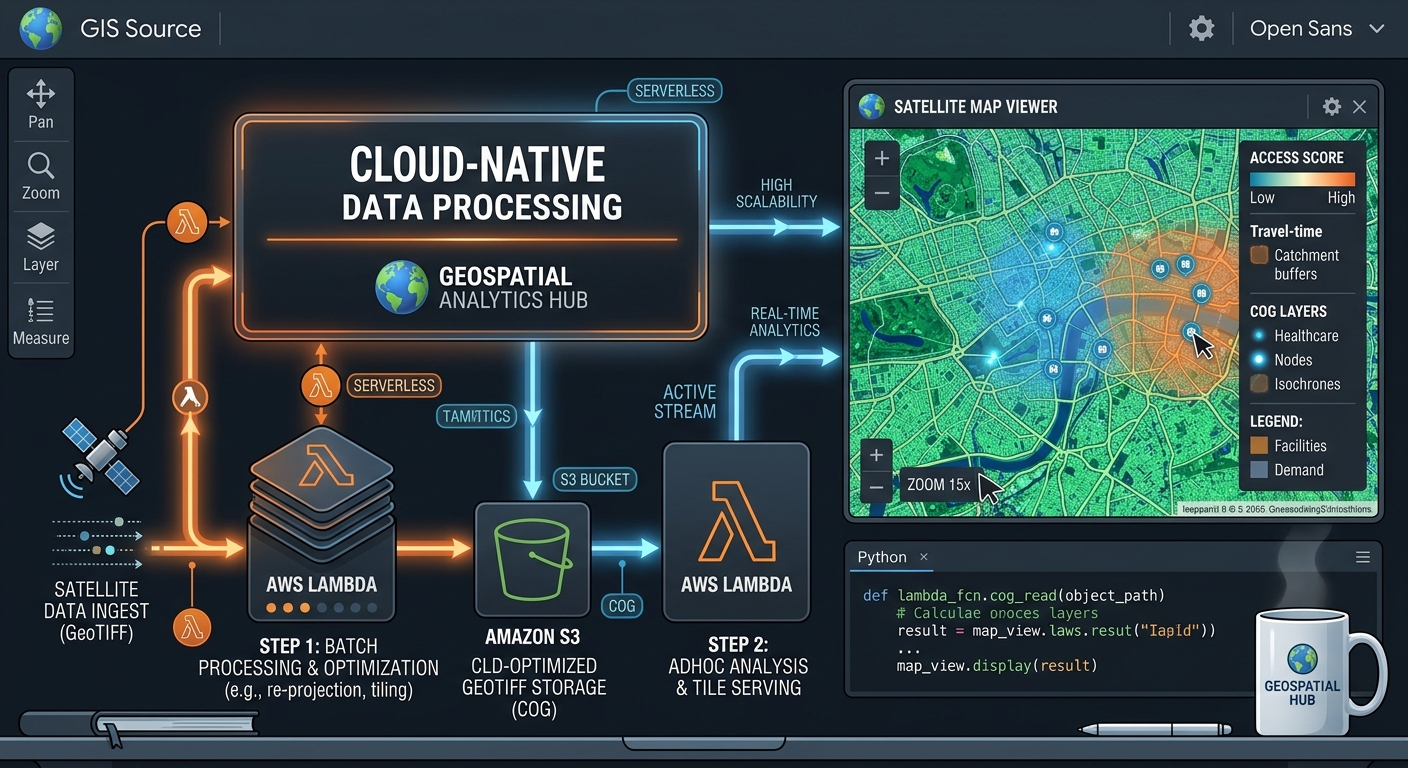
Image 1: Architecture diagram of a serverless COG tile rendering pipeline with AWS Lambda and S3
Alt Text: System architecture diagram illustrating serverless Cloud-Optimized GeoTIFF dynamic tile rendering using AWS Lambda, TiTiler, and Amazon S3.
Suggested diagram flow:
Satellite ingestion / STAC catalog
              |
              v
      COG validation and QA
              |
              v
       Amazon S3 imagery
              |
              v
    MosaicJSON catalog builder
              |
              v
 Amazon S3 metadata catalog
              |
              v
 MapLibre / Leaflet client
              |
              v
          CloudFront
              |
              v
        API Gateway
              |
              v
     AWS Lambda + TiTiler
              |
              +------> Read selected COG byte ranges
              |                  |
              |                  v
              |             Amazon S3
              |
              v
       Rendered raster tile
              |
              v
        CloudFront cache
The catalog builder can run as a separate batch or event-driven workload. It should not rebuild a large mosaic during every web request.
1.1 Amazon S3: COG storage
S3 stores the original raster assets and versioned MosaicJSON catalogs. Organize imagery by collection, acquisition date, and scene identifier so that individual assets can be managed independently.
For example:
s3://geo-data-prod/
├── sentinel2/
│   ├── 2026/10/scene_001.tif
│   └── 2026/10/scene_002.tif
└── catalogs/
    └── sentinel2/
        ├── v2026-10-28/
        │   └── mosaic.json
        └── v2026-10-28/
            └── catalog-metadata.json
Use immutable versioned catalog paths in production. This prevents a catalog update from silently changing the imagery behind previously cached tiles.
1.2 MosaicJSON: spatial indexing and asset selection
MosaicJSON describes the relationship between raster assets and the spatial regions they cover. It allows a mosaic-aware reader to identify candidate images for a requested tile instead of opening every scene in the archive.
The open-source cogeo-mosaic project generates and manages MosaicJSON definitions.
A MosaicJSON catalog is metadata, not a new merged raster. The source COGs remain separate objects in S3.
1.3 TiTiler and AWS Lambda: dynamic rendering
TiTiler is a FastAPI-based dynamic raster tiling service with support for COG, STAC, and MosaicJSON workflows. Its default application exposes raster tile endpoints and related metadata operations. See the official TiTiler documentation.
Lambda runs the application without requiring a permanently running tile-server fleet. When a request arrives, the service identifies the relevant COG assets, retrieves the required raster data, applies the requested rendering configuration, and returns an image.
1.4 API Gateway, CloudFront, and the client
API Gateway provides an HTTP interface to the rendering function. CloudFront sits in front of that interface to cache repeat requests close to users.
MapLibre GL JS and Leaflet consume the resulting PNG or JPEG tiles through standard raster-layer interfaces.
This arrangement is particularly useful for interactive environmental dashboards, land-cover monitoring, disaster response, agricultural intelligence, and satellite imagery portals.
2. Step One: Structure Satellite Scenes and Generate a MosaicJSON Catalog
The quality of a dynamic tile server depends on the quality of its input data and spatial index. Building MosaicJSON should therefore be part of the imagery ingestion pipeline, not an incidental deployment task.
2.1 Validate source COGs
Before adding a scene to the archive, confirm that the file is a valid COG and that its spatial metadata is correct.
Typical preprocessing checks include:
- Valid CRS, geotransform, dimensions, and bounds.
- Internal tiling and suitable overview levels.
- Correct NoData values, band descriptions, and data types.
- Consistent band order and scale/offset interpretation across the intended collection.
- Working remote range access and appropriate S3 permissions.
Use GDAL’s COG driver when converting source rasters. For example:
gdal_translate \
  source.tif \
  scene_001.tif \
  -of COG \
  -co COMPRESS=DEFLATE \
  -co BLOCKSIZE=512
The correct compression and overview resampling method depends on the raster data. Continuous imagery may benefit from averaging, while categorical land-cover rasters generally require nearest-neighbor or another suitable categorical method.
For reproducible processing, pin the GDAL version and record the conversion options in the ingestion metadata.
2.2 Maintain a manifest of eligible assets
Maintain a manifest that records each scene’s identifier, S3 URI, acquisition time, collection, processing level, footprint, and quality-control status.
For example, a text file accepted by cogeo-mosaic can contain one COG path per line:
s3://geo-data-prod/sentinel2/2026/10/scene_001.tif
s3://geo-data-prod/sentinel2/2026/10/scene_002.tif
s3://geo-data-prod/sentinel2/2026/10/scene_003.tif
Generate this manifest from the ingestion or STAC discovery workflow rather than repeatedly listing an entire archive during requests.
A STAC API satellite imagery pipeline is a useful upstream integration: filter scenes by geography, time, collection, and quality attributes before generating the mosaic catalog.
2.3 Generate the MosaicJSON catalog
Install the cogeo-mosaic package in a controlled build environment and create the mosaic definition:
python -m pip install cogeo-mosaic

cogeo-mosaic create \
  scenes.txt \
  -o mosaic.json \
  --threads 8
The command accepts a list of valid COG inputs and writes a MosaicJSON definition. Review the cogeo-mosaic CLI documentation for supported options, including zoom controls and tile-coverage sorting.
Validate the generated catalog and test that its asset references resolve correctly from the environment that will run TiTiler. The catalog builder’s AWS identity and the runtime Lambda identity may be different, so test both permissions separately.
Upload the generated catalog to a versioned S3 location:
aws s3 cp mosaic.json \
  s3://geo-data-prod/catalogs/sentinel2/v2026-10-28/mosaic.json
Keep a small deployment manifest alongside the catalog containing the build timestamp, source collection, selected scenes, software versions, and a checksum.
2.4 Design catalog boundaries deliberately
A single catalog containing every scene in a long-running satellite archive may become difficult to maintain. Generate separate catalogs for meaningful dimensions such as product type, region, acquisition period, or processing level.
For example:
/catalogs/sentinel2/region-a/2026-10/mosaic.json
/catalogs/sentinel2/region-b/2026-10/mosaic.json
/catalogs/landsat/region-a/2026-10/mosaic.json
This gives the service smaller metadata scopes and allows new versions to be published independently.
One important distinction: a spatial mosaic index is not inherently a temporal query engine. If users need the newest cloud-free scene, latest acquisition, or a particular time interval, implement that selection in the upstream catalog-generation workflow or a controlled STAC-aware service. Do not assume that simply putting every scene into MosaicJSON automatically produces the desired temporal composite.
3. Step Two: Package TiTiler as an AWS Lambda Container
Raster libraries can include substantial native dependencies. A container image provides a reproducible deployment unit containing the Python runtime, TiTiler, Rasterio/GDAL dependencies, and Lambda handler.
3.1 Choose the correct TiTiler package
For the full default application, use titiler.application. Current TiTiler packaging is divided into separate namespace packages; avoid relying on the old titiler metapackage.
For applications that only need a small subset of endpoints, a custom FastAPI application built from titiler.core and titiler.mosaic can reduce unnecessary dependencies. The trade-off is that custom endpoint registration and configuration must be maintained and tested by the team.
3.2 Create the Lambda handler
TiTiler’s FastAPI application uses ASGI, while Lambda invokes functions through an event-and-context interface. Mangum bridges this difference.
Create app.py:
from mangum import Mangum
from titiler.application.main import app

handler = Mangum(app, enable_lifespan=False)
This uses TiTiler’s default application and routes. Verify that the chosen TiTiler and Mangum versions are compatible with the handler configuration before pinning them for a production release.
3.3 Build the Docker image
Create requirements.txt:
titiler.application
mangum
These entries illustrate the package selection. For a production build, lock exact versions and resolve dependencies in CI so that rebuilding the image does not silently change native libraries or API behavior.
Create a Dockerfile:
FROM public.ecr.aws/lambda/python:3.12

ENV GDAL_DISABLE_READDIR_ON_OPEN=EMPTY_DIR

COPY requirements.txt ${LAMBDA_TASK_ROOT}/requirements.txt

RUN pip install --no-cache-dir \
    -r ${LAMBDA_TASK_ROOT}/requirements.txt

COPY app.py ${LAMBDA_TASK_ROOT}/app.py

CMD ["app.handler"]
This is a simple baseline rather than a guarantee of a minimal image. The full application includes more dependencies than a purpose-built mosaic-only service. Measure the resulting image size, cold-start behavior, and import time before selecting the final build.
AWS supports Lambda container images up to 10 GB uncompressed. Use a compatible single target architecture and build the image accordingly. Consult AWS’s Lambda container image requirements.
For an x86-64 Lambda deployment, build and test locally:
docker build \
  --platform linux/amd64 \
  --provenance=false \
  -t titiler-mosaic:latest .

docker run --rm -p 9000:8080 titiler-mosaic:latest
The AWS Lambda base image includes the runtime interface components required by Lambda. For local testing, invoke its runtime emulator with a Lambda event using the appropriate runtime path.
3.4 Push the image to Amazon ECR
Create an ECR repository in the same AWS Region as the Lambda function:
export AWS_REGION=us-east-1
export ACCOUNT_ID=$(aws sts get-caller-identity \
  --query Account --output text)

aws ecr create-repository \
  --repository-name titiler-mosaic \
  --region "$AWS_REGION"

aws ecr get-login-password --region "$AWS_REGION" \
  | docker login \
      --username AWS \
      --password-stdin \
      "$ACCOUNT_ID.dkr.ecr.$AWS_REGION.amazonaws.com"

docker tag titiler-mosaic:latest \
  "$ACCOUNT_ID.dkr.ecr.$AWS_REGION.amazonaws.com/titiler-mosaic:v1"

docker push \
  "$ACCOUNT_ID.dkr.ecr.$AWS_REGION.amazonaws.com/titiler-mosaic:v1"
Use immutable image tags or image digests in release pipelines instead of depending on a mutable latest tag.
3.5 Configure Lambda execution settings
Create the function using the image in ECR. A representative starting configuration for a tile-rendering workload is:
aws lambda create-function \
  --function-name titiler-mosaic \
  --package-type Image \
  --code ImageUri="$ACCOUNT_ID.dkr.ecr.$AWS_REGION.amazonaws.com/titiler-mosaic:v1" \
  --role arn:aws:iam::<ACCOUNT_ID>:role/TiTilerExecutionRole \
  --timeout 25 \
  --memory-size 2048 \
  --ephemeral-storage '{"Size":1024}' \
  --architectures x86_64 \
  --region "$AWS_REGION"
Replace the example role ARN with the actual execution role. The role should have CloudWatch Logs permissions and narrowly scoped s3:GetObject access to the intended raster and catalog prefixes. Add KMS permissions where customer-managed encryption keys require them.
The memory and timeout values are starting points, not universal production settings. Increase memory if CPU-bound rendering is slow, and configure ephemeral storage only when local temporary files require it. Lambda supports up to 15 minutes per invocation, but the practical timeout for interactive tiles is usually much shorter and must also fit the API Gateway integration’s limits.
For the official project-managed deployment approach, examine TiTiler’s AWS Lambda deployment documentation, which describes its CDK-based infrastructure.
4. Step Three: Expose Tile Endpoints Through API Gateway
After deploying the function, create an API Gateway HTTP API with a Lambda proxy integration. Use a catch-all route such as $default or suitable proxy routes so requests for metadata, TileJSON, and raster tiles reach the same application.
Configure the integration and invoke permissions, then confirm that the API forwards the complete request path and query string to the Lambda handler.
A MosaicJSON tile endpoint typically follows this pattern:
/mosaicjson/tiles/WebMercatorQuad/{z}/{x}/{y}.png?url={mosaic_json_url}For example, an encoded catalog URL could look like:
https://tiles.example.com/mosaicjson/tiles/WebMercatorQuad/8/74/96.png?url=s3%3A%2F%2Fgeo-data-prod%2Fcatalogs%2Fsentinel2%2Fv2026-10-28%2Fmosaic.jsonThe url parameter identifies the MosaicJSON input. TiTiler’s MosaicJSON endpoint reference documents tile generation, TileJSON, metadata, and asset-inspection routes.
Test the API before connecting a map
Check the catalog’s metadata endpoint first, then request a small number of image tiles:
curl -i \
  "https://tiles.example.com/mosaicjson/tiles/WebMercatorQuad/8/74/96.png?url=<ENCODED_MOSAIC_URL>" \
  -o test-tile.png
Replace the placeholder with the correctly URL-encoded catalog URI. Inspect the response status, headers, and image. Successful responses should have the appropriate image content type, such as image/png.
API Gateway proxy behavior, binary responses, CORS configuration, and integration timeouts must be tested with the chosen API type. See the AWS API Gateway binary response guidance when using a REST API that requires explicit binary media configuration.
Connect MapLibre or Leaflet
Once the service returns valid raster tiles, a web mapping client can add the mosaic as a raster source.
For MapLibre GL JS:
map.addSource("satellite-mosaic", {
  type: "raster",
  tiles: [
    "https://tiles.example.com/mosaicjson/tiles/WebMercatorQuad/{z}/{x}/{y}.png?url=<ENCODED_MOSAIC_URL>"
  ],
  tileSize: 256
});

map.addLayer({
  id: "satellite-mosaic-layer",
  type: "raster",
  source: "satellite-mosaic"
});
For Leaflet, use the same tile URL template with L.tileLayer() and set the required attribution, zoom range, and tile size.
The example assumes a catalog URL already authorized for the service. In a production application, do not blindly accept arbitrary catalog or raster URLs from public query parameters. That design can introduce server-side request forgery, unintended data access, and excessive storage costs. Prefer an application-controlled catalog identifier that maps to a fixed, allowlisted S3 object.
5. Step Four: Add CloudFront Caching and Optimize Request Costs
Dynamic rendering eliminates the need to precompute every tile, but it does not make raster reads or computation free. A request can cause multiple S3 range reads, asset-selection operations, raster reprojection, resampling, and image encoding.
CloudFront should therefore be considered a core component of the serving path, not an optional finishing touch.
5.1 Cache the final rendered tile
Configure a CloudFront distribution with API Gateway as its origin and expose a stable custom hostname such as tiles.example.com.
For public, repeatable imagery, set suitable Cache-Control headers on responses. For example:
Cache-Control: public, max-age=3600, s-maxage=86400
Content-Type: image/png
These values are illustrative; select the freshness period based on your publication and update policy. For immutable, versioned catalogs, much longer lifetimes may be appropriate.
A cache hit serves the previously rendered image without rerunning the full Lambda rendering operation. Consequently, it can reduce Lambda invocations, upstream S3 range reads, and response latency.
5.2 Build a cache key that matches rendering behavior
The cache key must distinguish requests that produce different pixels. A typical key may include:
- Tile path, including the matrix set and
z/x/ycoordinates. - Catalog or mosaic identifier.
- Band selection or raster expression, if supported by the configured endpoint.
- Rendering parameters such as color map, rescaling, or image format.
Avoid including parameters that do not change the response, because they fragment the cache unnecessarily. AWS documents these trade-offs in its CloudFront cache policy guide.
The most robust design replaces arbitrary catalog URLs with stable IDs, for example:
/tiles/sentinel2-oct-2026/{z}/{x}/{y}.png
/tiles/ndvi-oct-2026/{z}/{x}/{y}.png
An application-controlled route resolves each ID to a specific catalog and an approved rendering configuration. This both simplifies the cache key and limits the ways a client can request data.
5.3 Version the catalog instead of overwriting it
Suppose a catalog initially references 200 scenes and is later updated with 15 new acquisitions. If the catalog is overwritten at the same URL, previously cached tiles may remain visible until their TTL expires or the relevant cache entries are invalidated.
Publish the new catalog under a new versioned identifier and route new requests to that version. This provides predictable cache behavior and a practical rollback mechanism.
For frequently updated collections, use a controlled alias such as latest only at the application or catalog-resolution layer. Keep the underlying published catalog immutable.
5.4 Measure where costs originate
CloudFront cache-hit ratio alone is not sufficient. Track the full request path:
| Metric | Why it matters |
|---|---|
| CloudFront cache-hit ratio | Indicates how much traffic avoids the origin |
| API Gateway latency and errors | Reveals request-routing problems |
| Lambda duration and cold starts | Measures rendering overhead |
| Lambda concurrency and throttles | Indicates capacity constraints |
| S3 request volume and data transfer | Helps identify range-read costs |
| Tile response size | Influences delivery and cache efficiency |
| Catalog lookup latency | Exposes indexing or metadata bottlenecks |
The OGC COG access model depends on working HTTP range requests. If COGs are accessed through HTTP URLs or a CDN, validate range behavior and response headers. If using s3:// paths with GDAL’s S3 support, verify the AWS identity, region, and object permissions in the Lambda environment.
See the OGC COG range-request requirements for the underlying access model.
6. Production Engineering: Security, Performance, and Reliability
A successful prototype demonstrates that the service can render an image. An enterprise implementation must also control the amount of work each request can trigger.
6.1 Restrict data access
Keep source imagery private when public access is not necessary. Use the Lambda execution role for direct S3 access, least-privilege policies, and encryption appropriate to the dataset.
Do not allow anonymous users to specify arbitrary raster URIs, unrestricted band expressions, or arbitrary upstream URLs without validation. Apply authentication, authorization, rate limits, and an allowlist of supported products and rendering parameters.
If different customers have different data entitlements, do not share cached responses across access boundaries unless the cache policy and authorization design explicitly guarantee that the cached object is safe for every recipient.
6.2 Tune for raster workloads
Raster rendering is often CPU-intensive. Benchmark Lambda memory sizes and architectures against representative requests, including dense urban scenes, large multi-scene overlaps, and tiles near the edge of a coverage footprint.
Useful optimizations include:
- Precompute COG overviews using appropriate resampling methods.
- Eliminate invalid or duplicate assets during ingestion.
- Limit candidate imagery through catalog boundaries and indexes.
- Set realistic concurrency limits to protect downstream services.
- Keep dependencies and container images reproducible.
- Cache stable metadata and rendered tiles where freshness rules permit.
Do not assume that a serverless design automatically scales without constraint. Rapid traffic spikes can increase concurrent renders and S3 access volume. Establish concurrency, throttling, and error budgets using load tests.
6.3 Make mosaicking semantics explicit
A mosaic is not necessarily a scientific composite. The output may depend on the selected assets, their priority, overlap behavior, NoData handling, and the sequence in which pixels are read.
For normalized difference vegetation index (NDVI), for example, the expression is commonly:
[
NDVI=\frac{NIR-Red}{NIR+Red}
]
But producing reliable NDVI requires consistent band definitions, calibration, scale/offset interpretation, and handling for invalid or zero denominators.
TiTiler supports raster algorithms and configurable rendering through its available endpoints and application extensions. Confirm that the selected endpoint exposes the necessary operations before designing the client contract. If a particular scientific composite requires complex temporal ranking, cloud masking, or multiple processing stages, prepare that analytical layer upstream rather than expecting basic tile rendering to perform every operation automatically.
6.4 Plan for failure and observability
Use structured logs and attach a request or correlation identifier to each stage. Monitor latency percentiles, error categories, cache misses, throttles, and upstream storage failures.
Common failure patterns include:
- No tiles appear: Verify tile coordinates, bounds, zoom range, CRS, CORS, and API routing.
- Access denied: Check the Lambda role, bucket policy, encryption-key permissions, and catalog object access.
- Slow initial requests: Profile cold starts, package import time, remote asset metadata reads, and first-request behavior.
- Unexpected mosaic pixels: Inspect catalog membership, overlap priorities, NoData handling, band mapping, and source metadata.
- High request costs: Look for poor cache hits, unnecessarily broad catalogs, repeated metadata discovery, and excessive overlap among source assets.
Use repeatable test fixtures and a small set of known locations with expected render results. This provides a regression test every time TiTiler, Rasterio, GDAL, or the source imagery changes.
7. SEO Interlinking and Related Architecture Guides
This implementation fits within a broader cloud-native geospatial data platform. Link the guide to related technical content that explains the upstream discovery process, data lakehouse, and map delivery layer.
Recommended internal-link placements:
- STAC API satellite pipelines: Link from the MosaicJSON generation section to a tutorial on discovering and filtering satellite scenes by acquisition date, footprint, and quality metadata. Suggested slug:
/stac-api-satellite-pipelines/ - GeoParquet spatial data lakehouses: Link from the manifest and metadata discussion to a guide on querying geospatial metadata and vector footprints in cloud object storage. Suggested slug:
/query-geoparquet-spatial-data-lakehouse/ - Web mapping performance optimization: Link from the CloudFront section to a guide on raster tile caching, client-side layer loading, and responsive map rendering. Suggested slug:
/web-mapping-performance-optimization/
These are suggested internal slugs, not verified existing pages. Replace them with the site’s actual published URLs before publication.
For external references, prioritize the official TiTiler, cogeo-mosaic, AWS Lambda, CloudFront, and OGC documentation cited in this guide.
Summary and Enterprise Takeaways
A serverless COG dynamic mosaicing service combines object storage, spatial indexing, on-demand raster rendering, and edge caching into one delivery architecture.
The essential design decisions are to keep COGs valid and efficiently organized, generate MosaicJSON catalogs in a separate ingestion workflow, deploy a reproducible TiTiler container to Lambda, expose controlled endpoints through API Gateway, and cache rendered images using a key that accurately reflects the requested output.
The most important enterprise principle is to separate asset discovery, catalog publication, pixel processing, and tile delivery. That separation improves security, debugging, reproducibility, and operational control.
Serverless COG Dynamic Mosaicing TiTiler AWS Lambda is a strong fit for variable-demand raster services with substantial opportunities for cache reuse. However, continuously high traffic, computationally intensive analytics, large temporal composites, and strict latency requirements may justify evaluating a persistent container service alongside Lambda.
The right architecture is the one that meets the application’s latency, consistency, access-control, and cost targets under realistic workloads—not simply the one that eliminates server management.
Ready to eliminate traditional tile-rendering bottlenecks and scale your spatial infrastructure? Reach out for expert guidance and professional project support to master your own Serverless COG Dynamic Mosaicing TiTiler AWS Lambda architecture today, and discover how custom geospatial automation can transform your web mapping applications.